
From finding a reward to checking out, with fewer reasons to hesitate
I reworked product discovery in a large rewards catalog, then carried the same decision hierarchy through item detail, cart and checkout on desktop and phone.
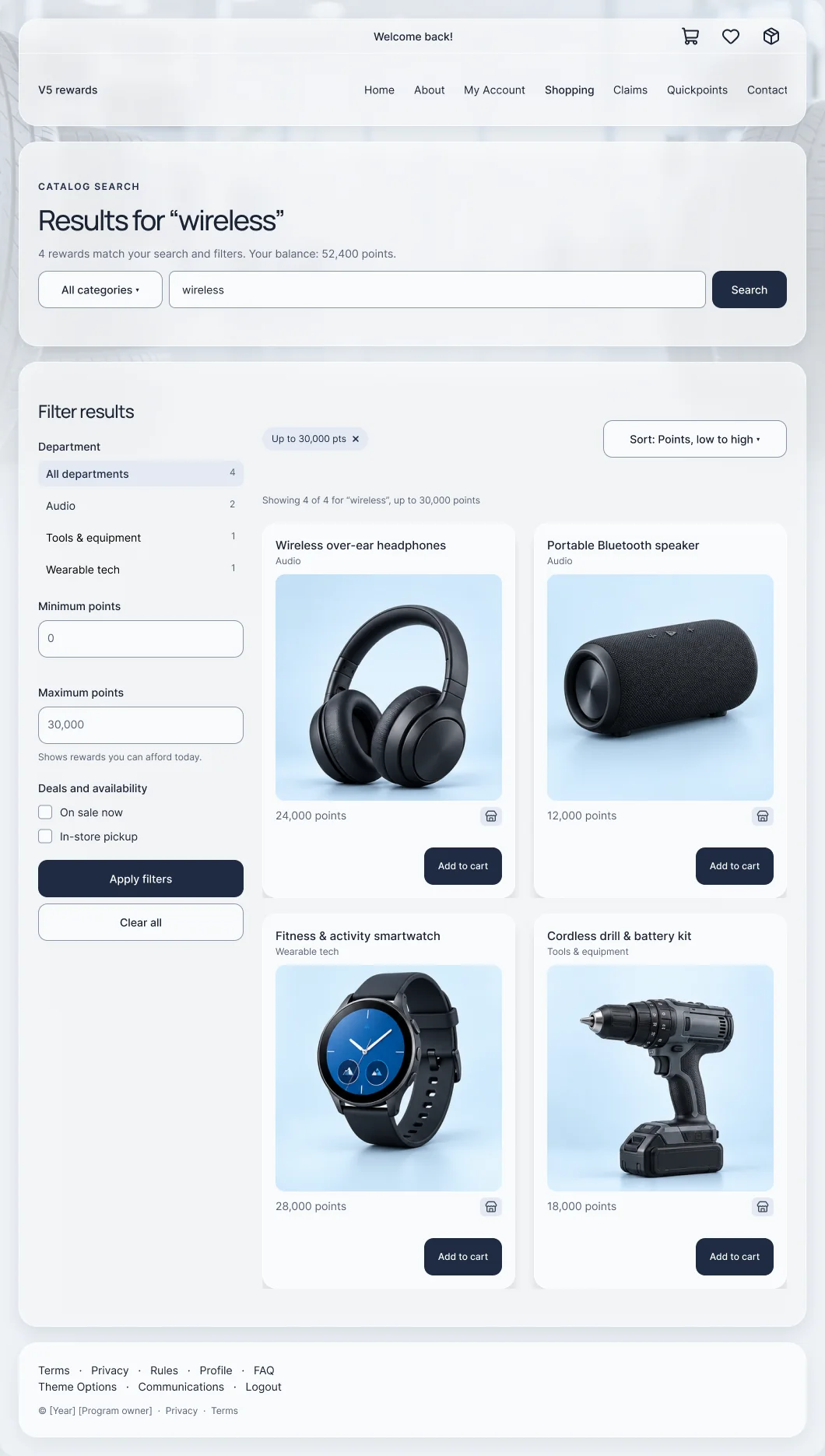
Product discovery, interaction design and responsive behavior across the shopping journey.
Keep the existing points, cart and checkout business logic intact.
- Interaction design
- Responsive UI
- Journey mapping
- Rule tests
The 30-second version
For busy reviewersThe problem
Participants had a very large catalog and a fixed points balance. Finding a relevant item was slow, the cost and the action weren’t always together, and the phone experience was a squeezed desktop.
What I did
I reworked discovery (search in context, department and points filters), rebuilt the item and cart hierarchy responsively, and mapped checkout’s hesitation and recovery paths.
The result
One decision hierarchy from search to checkout, on desktop and phone, built on the existing business logic. No conversion lift is claimed.
A catalog is a sequence of decisions, not a grid of products
What someone needs to know before they spend their points.
A rewards catalog asks people to compare a large set of items, understand a points cost and make a confident choice with a balance they earned. Every step either builds that confidence or adds a reason to leave.
This is a distinct feature inside the same enterprise platform as the V5 migration. The business rules for points, cart and checkout stayed as they were; the work was in how people find, judge and commit.
- Discover: is there something here worth my points?
- Decide: can I afford it, and what’s left after?
- Commit: what am I ordering, where is it going, and can I back out?
- Discovery, interaction design and responsive behavior
- Item, cart and checkout hierarchy
- Journey and recovery mapping, with focused rule tests
- Not owned: points rules, pricing, stock or fulfillment
Three decisions that shaped the flow
Each one lists the constraint, the call, and what it cost.
1 · Narrow the results without leaving them
- Constraint
- A very large catalog, and a legacy layout where the department list was the main way in. Every refinement meant starting over.
- Decision
- The query stays in a summary bar above the results. Department counts, a points range and availability filters sit beside the grid, applied filters show as removable chips, and every card repeats the same image, name and points rhythm.
- Trade-off
- A filter column takes width from the grid. On a phone, filters move behind one button so the results come first.
2 · Put the cost, the balance and the action in one place
- Constraint
- People spend a fixed balance they earned. If the points cost and the remaining balance live on different screens, every add to cart is a guess.
- Decision
- The item page groups points, availability, quantity and Add to cart in one column, with a balance check that shows what would remain. The cart repeats the balance in the order summary before Checkout.
- Trade-off
- More numbers on the page. Each one answers a question people would otherwise leave the page to check.
3 · Make the commitment explicit, and recoverable
- Constraint
- Checkout combines a shipping address, a redemption policy and an order that can’t easily be undone, and the archived checkbox was easy to miss.
- Decision
- Checkout shows three steps (cart, shipping, confirm), a visible policy acknowledgment and a review card next to Place order, with a clear way back to the cart.
- Trade-off
- One more deliberate step for people who already know what they want. It protects the moment that is hardest to reverse.
One path from search to a placed order
The flow every redemption follows.
- Search
Query in view, with department, points and availability filters.
- Compare
Consistent cards; removable filter chips.
- Decide
Points, balance check and Add to cart together.
- Review
Editable items apart from the order summary.
- Check out
Shipping, policy acknowledgment and an order review.
Same catalog, before and after
Legacy capture next to the hi-fi design. Hi-fi designs in the V5 design system, rebuilt from the shipped catalog flow and anonymized.
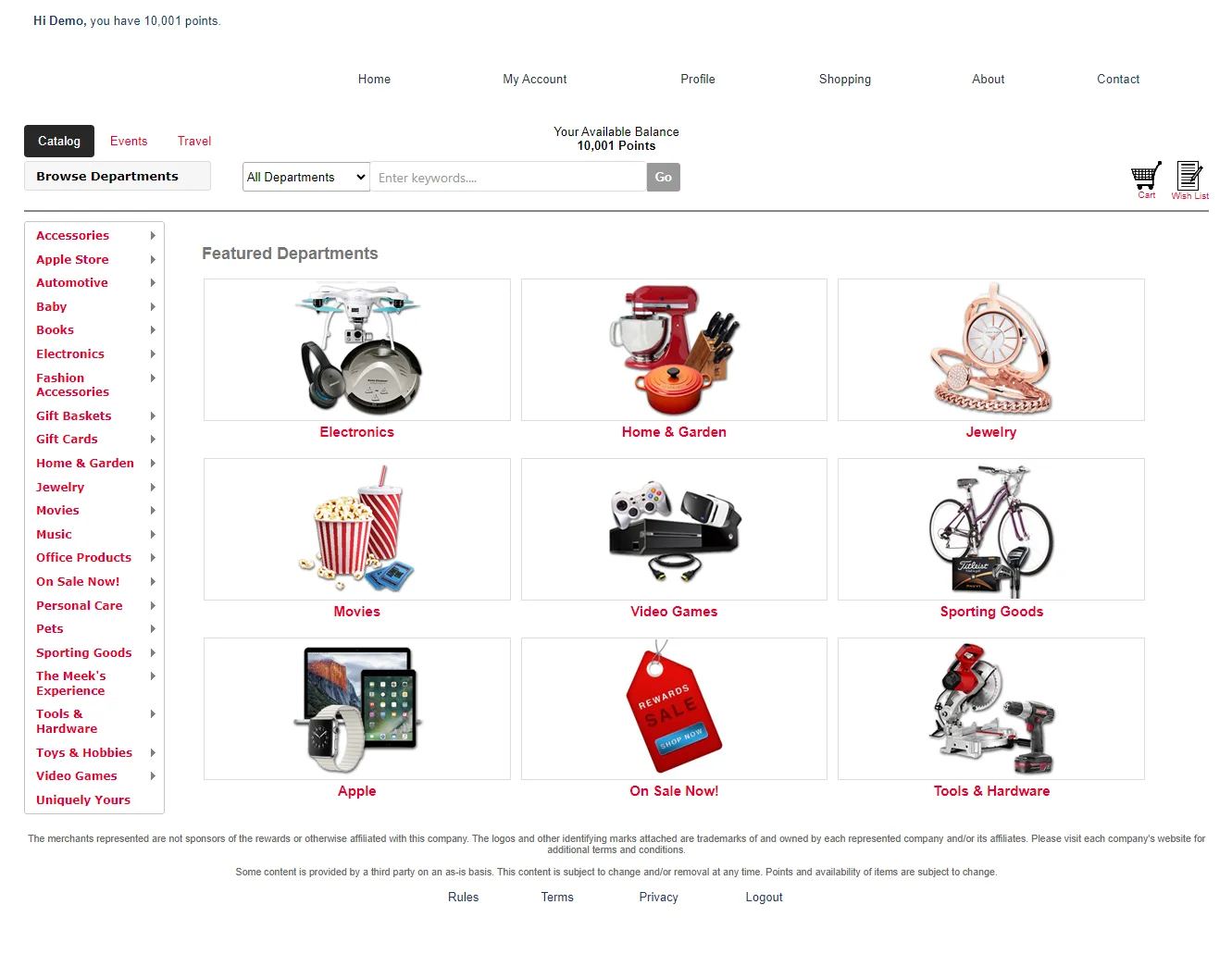
Before: legacy catalog, anonymized. After: Hi-fi designs in the V5 design system, rebuilt from the shipped catalog flow and anonymized.
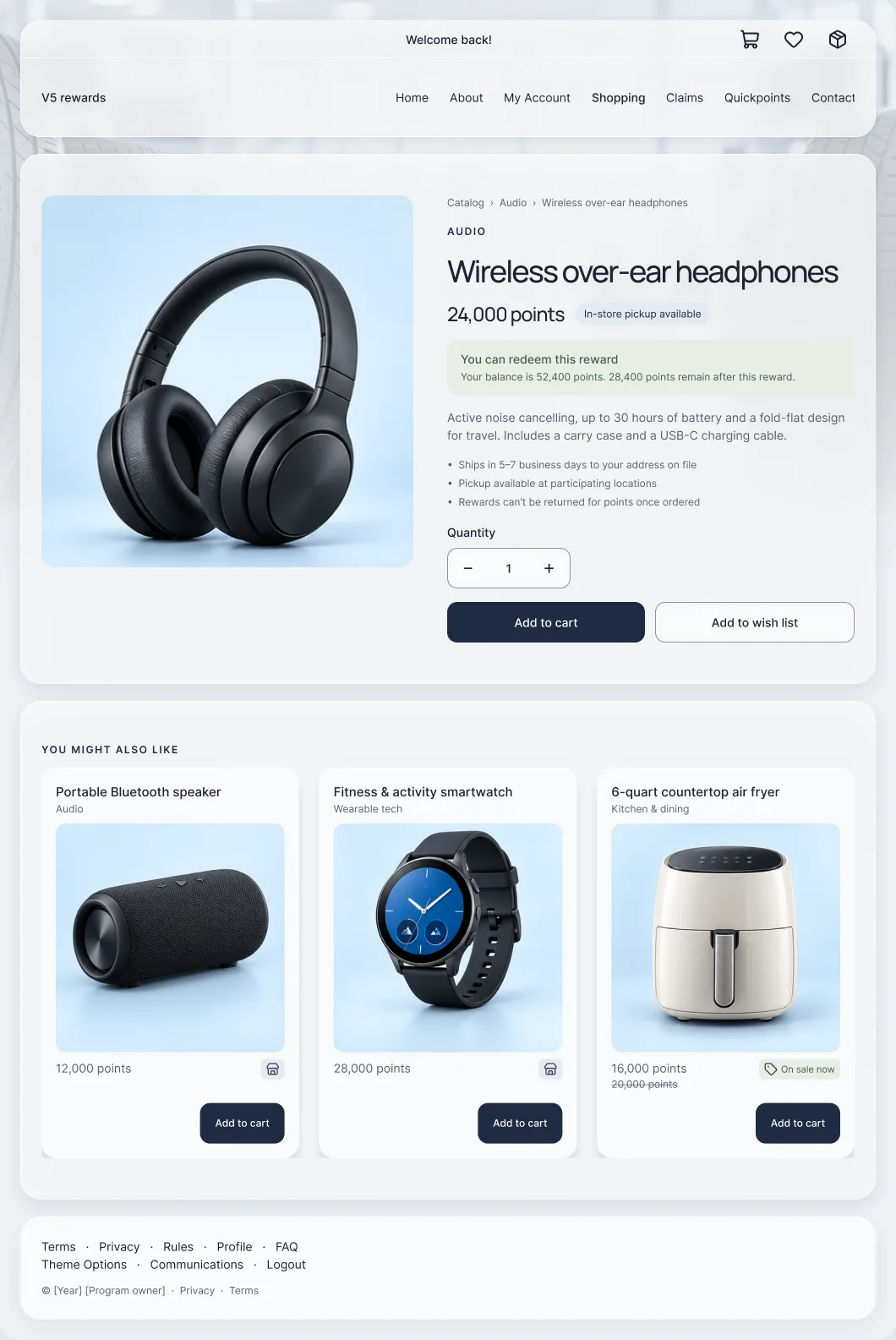
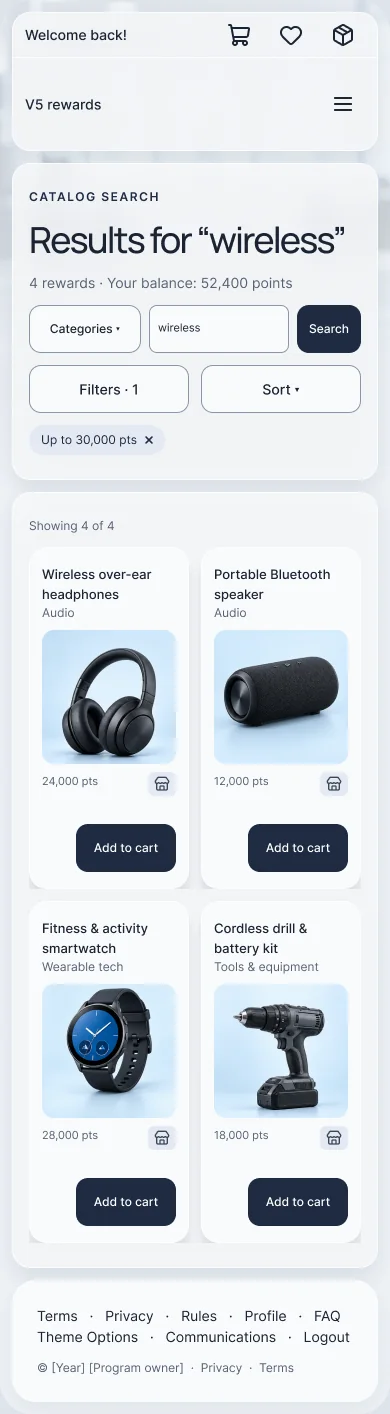
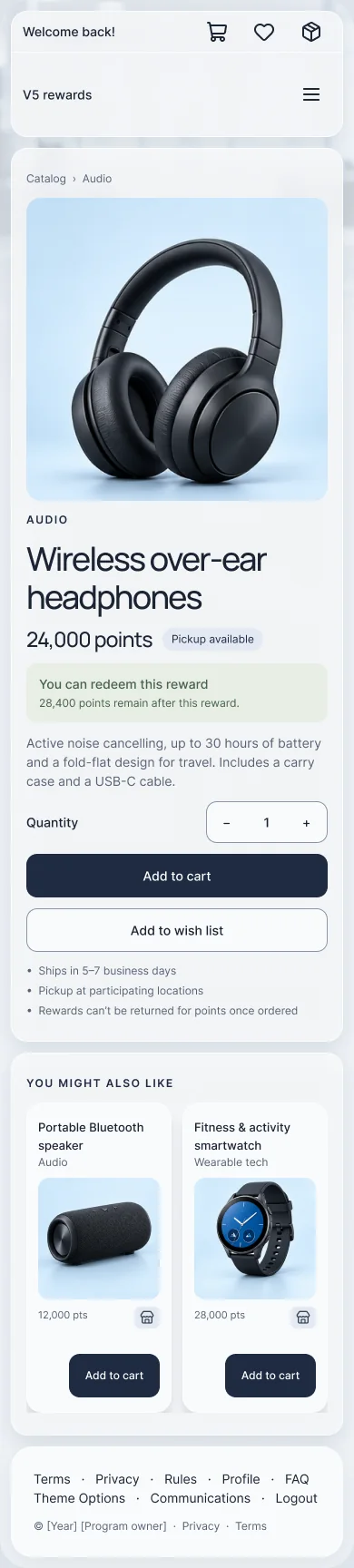
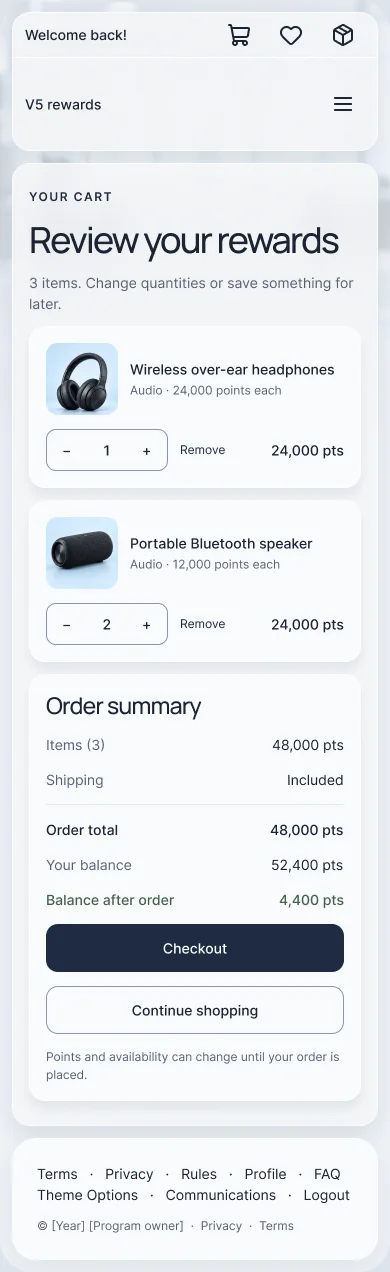
Hi-fi designs in the V5 design system, rebuilt from the shipped catalog flow and anonymized.

Historical UI Left: the actual mobile capture.
Hi-fi · V5 system Right: the same task in the V5 system.
Review is not commitment
Cart and checkout in the V5 system, and the paths people take when checkout isn’t the next step.
The cart separates editable choices from the order summary. Quantity and removal stay with each item; the total, the balance after the order and one Checkout action form a second, clear group.
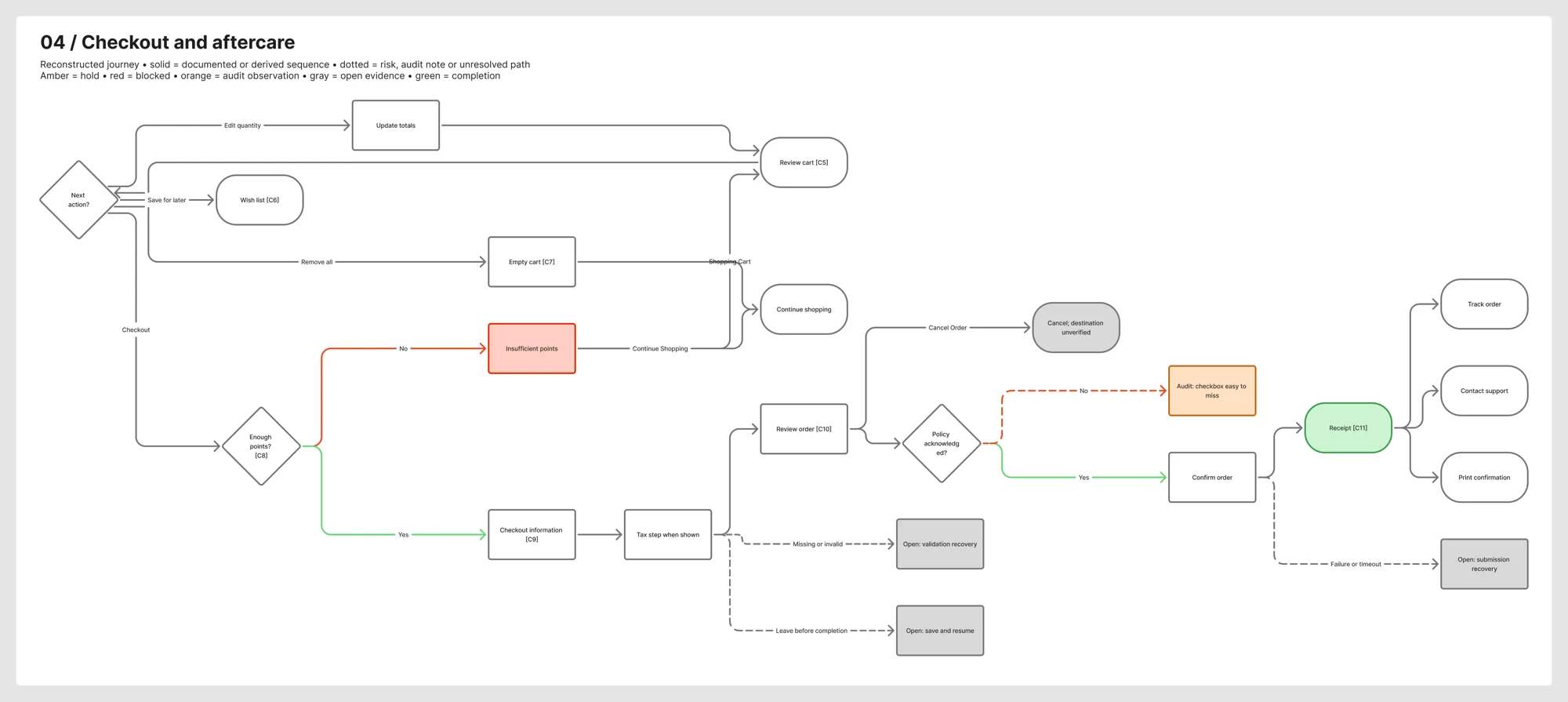
People save items, empty carts, run short on points or leave before confirming. Those are product journeys too, so I mapped them alongside the happy path.
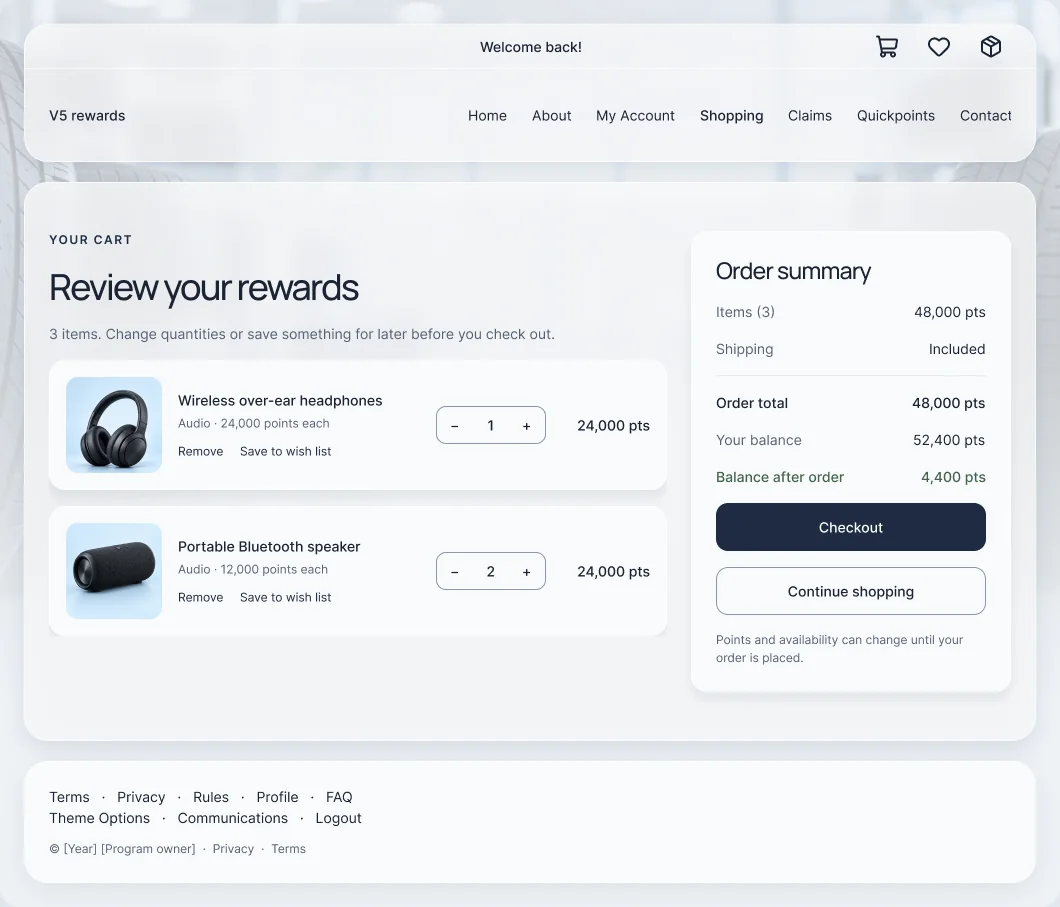
Cart. Hi-fi designs in the V5 design system, rebuilt from the shipped catalog flow and anonymized.
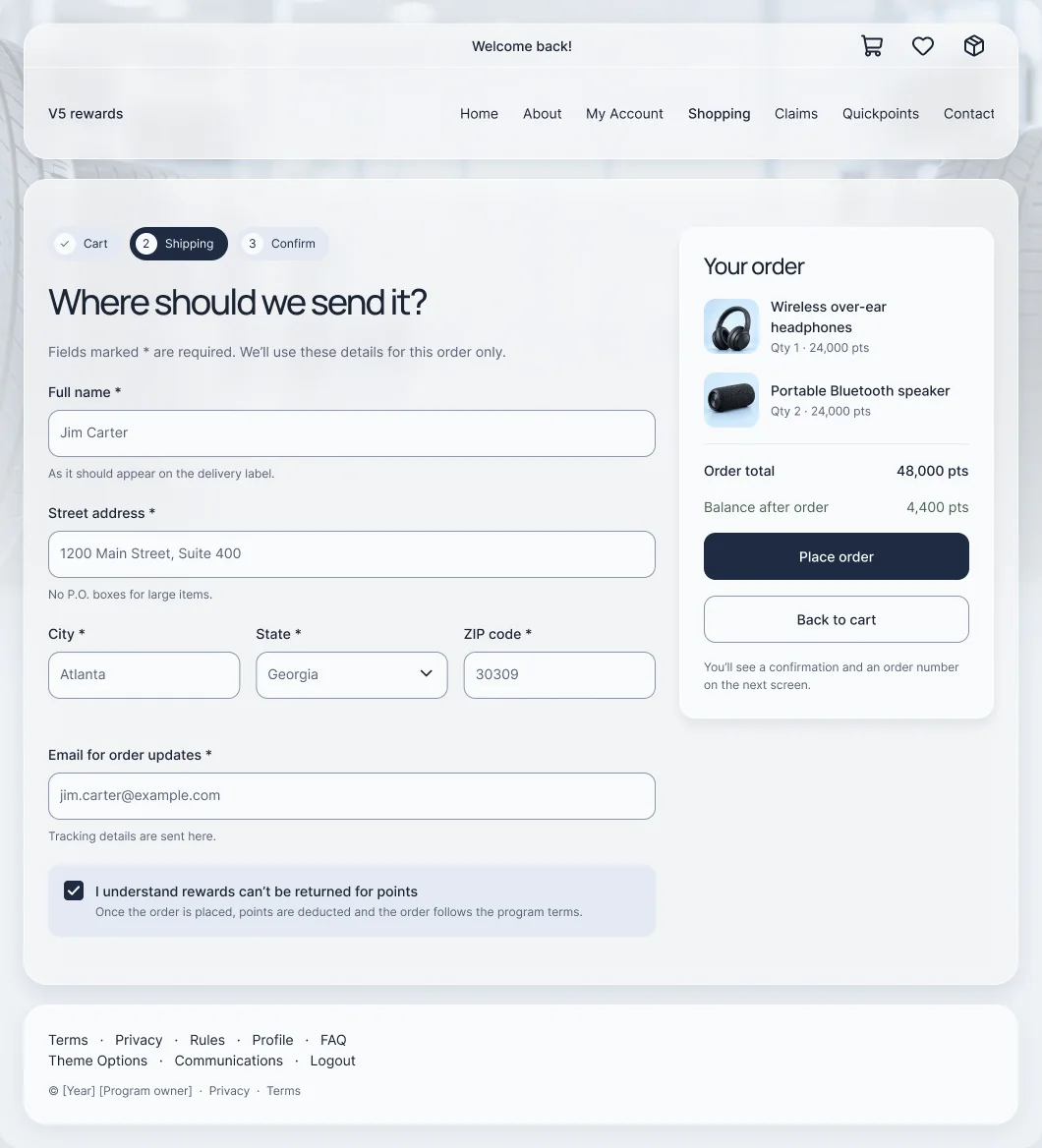
Checkout. Hi-fi designs in the V5 design system, rebuilt from the shipped catalog flow and anonymized.
Check the boundary, not just the successful order
Small, focused rule tests around the points check and policy acknowledgment.
Checkout is blocked with two clear ways forward: back to the cart or continue shopping.
A balance equal to the total proceeds. Off-by-one rules are where trust quietly breaks.
Place order waits for the acknowledgment, which now sits next to the action instead of below it.
A missing balance or price fails safely instead of guessing.
These checks don’t place orders or establish tax, stock or fulfillment eligibility.
Every screen in the flow, on desktop and phone
All eight hi-fi screens, in the order people use them. Hi-fi designs in the V5 design system, rebuilt from the shipped catalog flow and anonymized.
Query in a summary bar, department and points filters, removable chips and consistent reward cards.
Points, pickup availability and a balance check sit with quantity and Add to cart; related rewards below.
Editable line items on one side; total, current balance and balance after the order on the other.
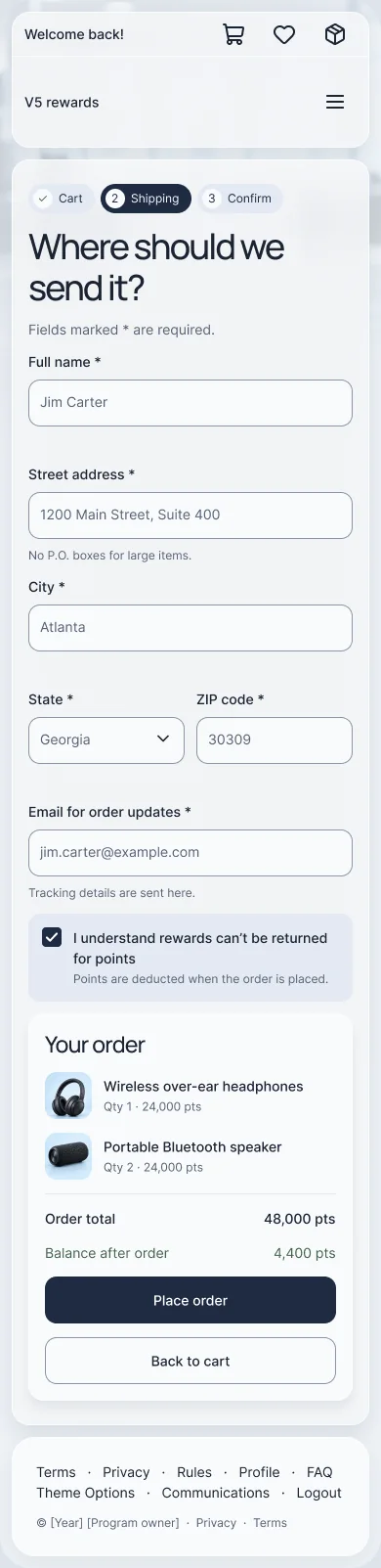
Three steps, shipping details, a policy acknowledgment and an order review next to Place order.
What the evidence supports, and what it doesn’t
Every number is labeled with how it was collected.
- One decision hierarchy from search to checkout, on desktop and phone.
- How cost, balance and action stay together at each step.
- The recovery paths mapped alongside the happy path.
- No measured change in conversion, order volume or support contacts.
- The hi-fi screens show the design in the V5 system; the historical captures show what came before.
- No usability study is claimed for these screens.
Edge cases and alternatives
Where the happy path needed more care, and what else was on the table.
Not enough points
A cart total above the balance is a dead end unless the next step is obvious.
Handling: block checkout, say how many points are missing, and offer the cart or continue shopping.
Long descriptions on a phone
The archived mobile item page pushed Add to cart below a long description.
Handling: keep points, balance and the action above the description; test whether the description is still found.
Category browsing first
Lead with a department tree, as the legacy catalog did. Familiar, but slow when people already know what they want.
Retrospective comparison, not a documented rejected proposal.
One-page checkout
Shipping, policy and review on a single form. Faster, but it hides the moment of commitment in a long scroll.
Retrospective concept, not a documented historical proposal.
Switch to Deep for edge cases and alternatives.
A clear hierarchy still has to earn its clarity with users
What I’d do differently, and what I’d measure next.
The designs make one consistent path from search to a placed order, on desktop and phone. They make the decisions concrete. They don’t prove a conversion change, and I don’t claim one.
Compact isn’t automatically easier. I would test the hierarchy with realistic item-finding tasks and carry the same scrutiny into recovery: insufficient points, an empty cart and an interrupted checkout should always have an understandable next step.
- Test search refinement and filters with realistic tasks.
- Test description discoverability and the item-to-action hierarchy on desktop and phone.
- Measure search refinement, item-to-cart progression and checkout abandonment.
- Validate insufficient-points recovery and policy acknowledgment against the actual checkout rules.